Money Map
Read the visual flow from known acquisition sources to linked revenue.
Money Map groups the paths between acquisition sources and revenue that Graytower can support with tracked visitors and matched payments.
Read a flow
Open Revenue → Revenue flow, then select Flow. Ranked shows the same attributed revenue as bars. With multiple currencies, choose Analysis currency before comparing amounts.
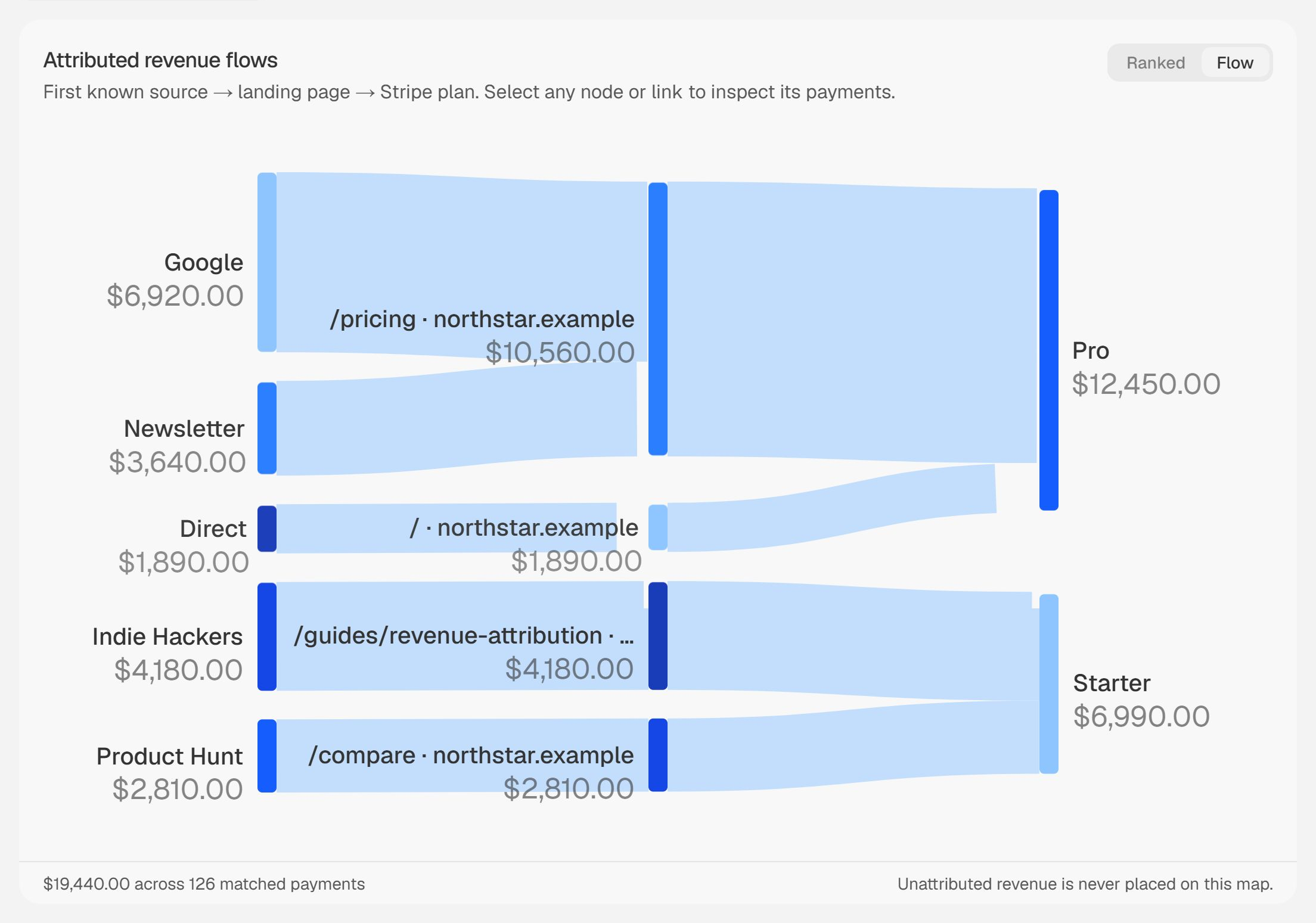
Start at a source, follow its path, and open it for more detail. A wider flow represents more recorded, linked revenue in the selected currency and date range. It shows what Graytower can connect; it does not predict what another visit from that source will earn.
 Open full size
Flow connects first-known source → landing page → Stripe plan. The footer totals attributed payments only. Unattributed revenue is never placed on this map.
Illustrative sample data.
Reconcile the map with total revenue
The map only shows attributed revenue. Your total revenue also includes unattributed revenue, which should not be assumed to belong to the map's largest source. In the example above, the map shows $19,440 of a $24,860 total; the other $5,420 is unattributed. When you compare amounts, keep the same currency and date range across views.